Product walkthrough · Under 3 minutes
How Kodex works for an analyst
One law enforcement data request in 12 steps, from the moment it arrives until it’s closed.
This is how an analyst handles a law enforcement data request on Kodex. We'll follow one request from the moment it arrives until it's closed, one step at a time.
Step one, sign in. Sam is an analyst at Commonwealth Utility. Kodex emails Sam a sign-in link that works for ten minutes.
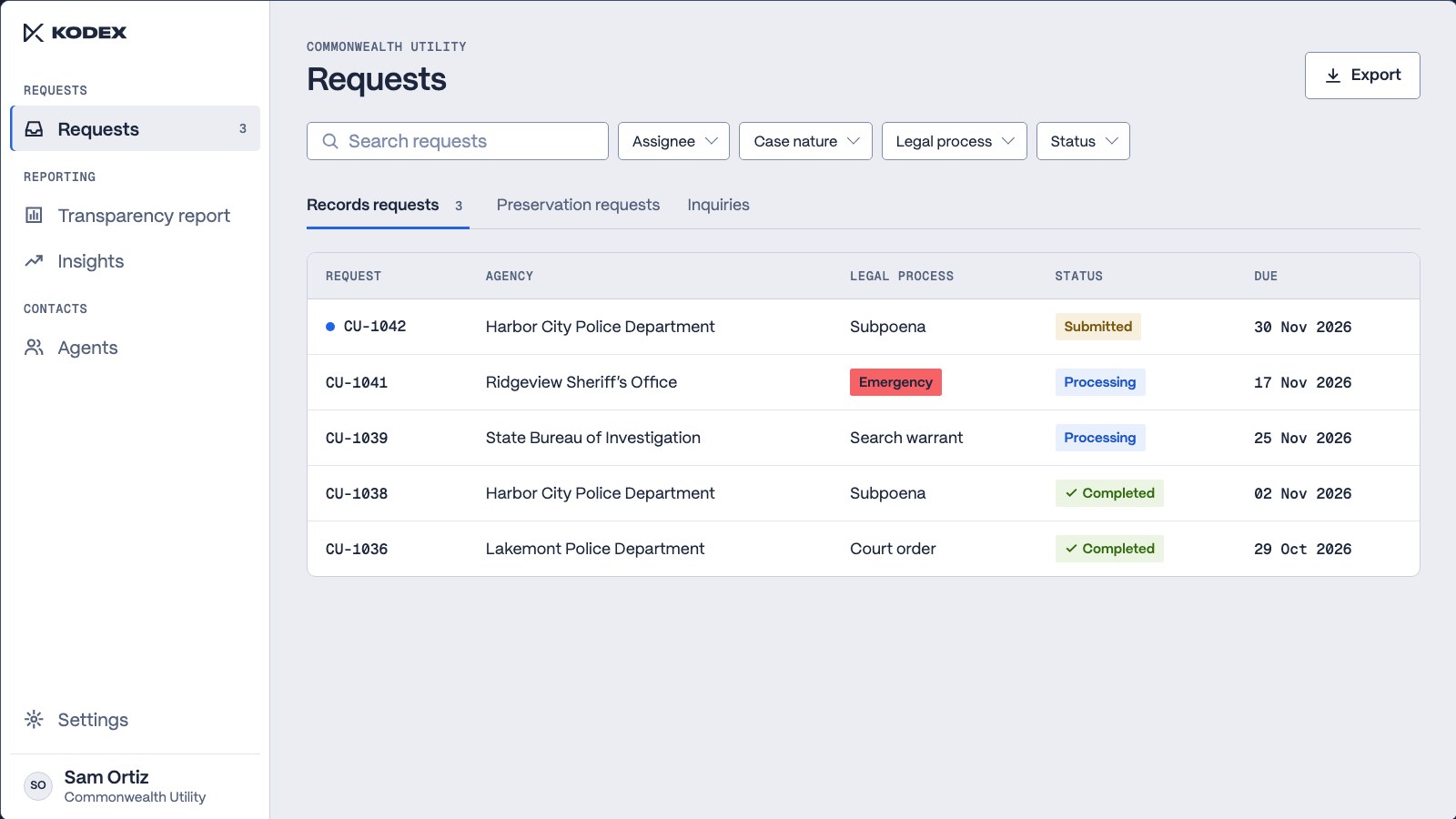
Step two, open the request. Every request comes into one queue, and each row shows the agency, the legal process, the status, and the due date. A new subpoena from Harbor City Police Department sits at the top, so Sam opens it.
Step three, review the request. The detective's message is on the timeline. The case details sit beside it, including the legal process and the due date.
Step four, verify the requester. Kodex has already confirmed the detective's account with the agency, so Sam knows who is asking before any records are pulled.
Step five, read the legal process. The subpoena opens right on the request. It names three email addresses and the records the agency wants for each.
Step six, find the accounts. Commonwealth Utility's own API has already searched for those three addresses, and one matched an account. If you have the production API set up, the production arrives here automatically. Otherwise, you can upload it yourself.
Step seven, accept the request. Sam opens the review, starts from a message template, and accepts. The detective sees the reply and the new status right away.
Step eight, message the agency. Sam can write to the detective right on the request. Two of the addresses didn't match an account, so Sam asks the detective to confirm them. The reply comes back on the same timeline. Internal notes stay with the team, and the agency never sees them.
Step nine, deliver the records. Sam attaches the production, selects data provided as the reason, and completes the request.
Step ten, check the audit trail. The request is complete, and every action taken along the way is listed with its time, from the first message to the delivery.
Step eleven, report. Each request handled on Kodex feeds the transparency report, so the numbers for each legal process are ready to export with no manual entry.
Step twelve, track the work. Insights shows how many requests are coming in and how quickly the team responds. The case assignment view shows how many open requests each person is carrying.
That's one request from start to finish. Your Kodex team can walk you through how this would work for your company.
The walkthrough
Twelve steps, one request
The walkthrough follows one subpoena from a police department to a company’s legal response team. The request, the agency and the people in it are sample data.
Sign in
Sam is an analyst at Commonwealth Utility. Kodex emails a sign-in link that works for ten minutes. 00:10
Open the request
Every request comes into one queue. Each row shows the agency, the legal process, the status and the due date, and a new subpoena sits at the top. 00:17
Review the request
The detective’s message is on the timeline. The case details sit beside it, including the legal process and the due date. 00:34
Verify the requester
Kodex has already confirmed the detective’s account with the agency, so Sam knows who is asking before any records are pulled. 00:44
Read the legal process
The subpoena opens right on the request. It names three email addresses and the records the agency wants for each. 00:53
Find the accounts
The company’s own API has already searched for the three addresses, and one matched an account. With the production API set up, the production arrives on the request automatically. Without it, the analyst uploads the file. 01:03
Accept the request
Sam opens the review, starts from a message template and accepts. The detective sees the reply and the new status right away. 01:20
Message the agency
Two of the addresses didn’t match an account, so Sam asks the detective to confirm them. The reply comes back on the same timeline. Internal notes stay with the team. 01:32
Deliver the records
Sam attaches the production, selects the reason and completes the request. 01:50
Check the audit trail
The request is complete. Every action taken along the way is listed with its time, from the first message to the delivery. 01:58
Report
Each request handled on Kodex feeds the transparency report, so the numbers for each legal process are ready to export with no manual entry. 02:09
Track the work
Insights shows how many requests are coming in and how quickly the team responds. The case assignment view shows how many open requests each person is carrying. 02:20
Next step
See it with your team
Your Kodex team can walk you through how this would work for your company.